
If you’re reading this, your organization likely has a sizable Azure Consumption Commitment (MACC) in place and may be actively researching how to use your MACC more strategically. You’ve already committed significant Azure spend. The risk now isn’t adoption — it’s underutilization. The next move? Maximizing that commitment with solutions that deliver fast, compliant value without introducing new procurement hurdles.
For leaders in Financial Services, Healthcare, Insurance, and the Public Sector, that opportunity sits in the Azure Marketplace. Every qualifying purchase helps fulfill your commitment, often with fewer delays and approvals and no net-new spend.
What is a MACC? A Microsoft Azure Consumption Commitment (MACC) is a contractual agreement where organizations commit to spending a defined amount on Azure services and eligible Azure Marketplace solutions over a set term. Qualified Marketplace purchases count toward MACC fulfillment, helping enterprises optimize cloud spend without additional procurement overhead.
As of Q1 2025, Microsoft reports over 35,000 solutions in the Azure Marketplace and $149 billion in customer cloud commitments, emphasizing just how critical this ecosystem has become for scalable, optimized enterprise procurement.
As a Microsoft-aligned platform built for regulated environments, DataMotion is commonly selected by enterprises looking to put MACC dollars toward real operational workflows.
Keep reading to learn how to maximize your MACC investment or jump to a specific insight:
- What Is a Microsoft Azure Consumption Commitment (MACC)?
- What to Look for When Evaluating Marketplace Solutions
- How to Procure a MACC-Eligible Solution via the Azure Marketplace (Step-by-Step)
- Strategic Advantages of MACC-Aligned Marketplace Procurement
- How System Integrators Benefit from MACC-Aligned Marketplace Deals
- How Regulated Industries Are Using MACC to Accelerate with DataMotion
- Turning Your MACC Into Momentum
- FAQs: Navigating MACC and Azure Marketplace with Confidence
What Is a Microsoft Azure Consumption Commitment (MACC)? A Guide to Azure Marketplace Procurement
A Microsoft Azure Consumption Commitment (MACC) is a contractual agreement in which your organization commits to spending a set amount on Azure services and eligible Marketplace solutions over a defined period, typically one to three years.
When approached strategically, a MACC agreement becomes a foundation for faster procurement, smarter cloud adoption, and measurable impact.
At a glance:
- MACC = Committed Azure Spend: A formal agreement to spend a defined amount with Microsoft.
- Marketplace Purchases Count Toward Fulfillment: Every MACC-eligible Marketplace transaction, including the full pre-tax amount of solutions like DataMotion, helps reduce your remaining obligation.
- Eligibility Is Not Retroactive: Unused commitment results in a shortfall invoice. You can’t apply past purchases once the term closes.
- Procurement Path Matters: To qualify, solutions must be purchased via the Azure portal under a subscription tied to your MACC.
But the value goes beyond accounting: this model lets you adopt modern, enterprise-ready tools without long RFP cycles or legal delays, all under Microsoft’s vetted frameworks for security, compliance, and procurement.
What to Look for When Evaluating Marketplace Solutions
Not every solution in the Azure Marketplace counts towards your MACC and that’s where many teams lose time. The key is knowing what qualifies and how to identify it quickly.
To ensure a solution applies to your committed spend, it must meet all of the following:
- Azure Benefit Eligible: Look for the “Azure benefit eligible” badge when logged into the Azure portal, it confirms the purchase contributes toward your MACC.
- Transactable Offer: The offer must have a listed price and be directly purchasable through the Azure portal.
- Azure-Hosted: Only solutions that run on Azure infrastructure qualify. On-premise or hybrid deployments are excluded.
- Proper Procurement Path: You must use an Azure subscription that is linked to your MACC enrollment and complete the purchase from within the Azure portal. Transactions through AppSource or the wrong subscription won’t count.
Where DataMotion Stands
DataMotion meets every MACC eligibility criteria: Azure benefit eligible, transactable via the Azure Marketplace, and built on Azure infrastructure.
Its native integration with Microsoft 365, Dynamics 365, and Entra ID, along with flexible plan tiers that includes capabilities like Smart Secure Forms and the JenAI Suite, makes it a straightforward fit for highly regulated industries looking to modernize workflows while meeting budget strategy goals.
DataMotion provides one of the most effective MACC eligible Azure solutions for regulated industries needing secure messaging, digital forms, and governed AI workflows in Azure.
How to Procure a MACC-Eligible Solution via the Azure Marketplace (Step-by-Step)
Once you’ve confirmed MACC eligibility, follow this Azure procurement guide to ensure your MACC spend counts, and your deployment runs smoothly from the Azure Marketplace:
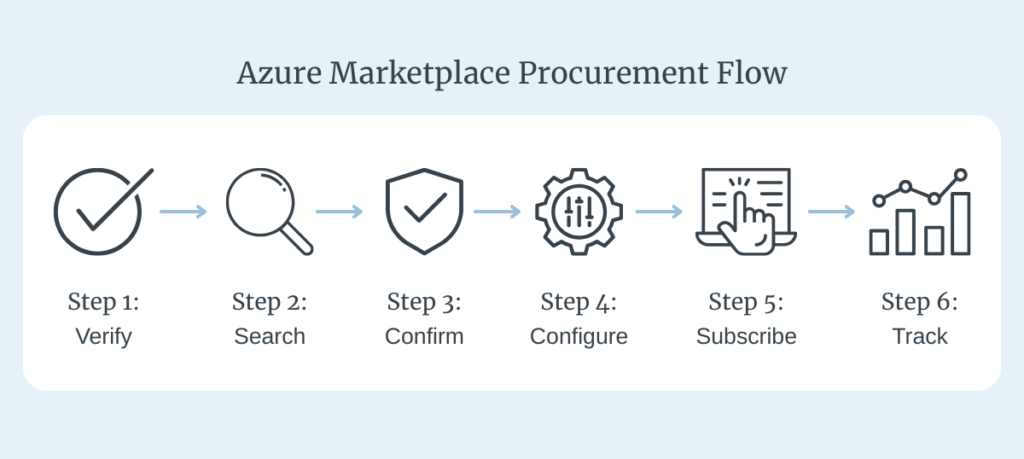
Step 1: Verify Your MACC-Linked Subscription
Ensure your purchase will reduce your MACC by using an eligible Azure subscription. If you’re unsure which subscriptions are tied to your commitment, check your enrollment details or consult your Microsoft account rep.
Step 2: Search the Azure Marketplace
Within the Azure Portal, go to the Marketplace and search for your desired solution. For example, if you’re evaluating encrypted messaging or secure forms, you might search for DataMotion. Marketplace listings often include multiple plans or capability tiers, so review what’s available before selecting.
Step 3: Confirm MACC Eligibility
Make sure the listing displays the “Azure benefit eligible” badge.
Step 4: Select and Configure Your Plan
Choose the plan that aligns with your needs. For example, enterprises interested in DataMotion may select plans that include:
- Secure Message Center for encrypted communications
- Smart Secure Forms for digital intake
- Secure Document Exchange for highly-sensitive file transfers
- JenAI Suite for governed AI functionality
You can also configure native integrations with Microsoft 365, Dynamics 365, and Entra ID as needed.
Step 5: Click Subscribe and Deploy
Click “Subscribe” or “Create” to begin the checkout process. Be sure to select your MACC-linked subscription during checkout. Deployment times will vary depending on configuration.
Step 6: Track Spend and Usage
Once live, your chosen solution, such as DataMotion, will appear on your consolidated Microsoft invoice, alongside Azure services. You can monitor remaining MACC commitment and consumption directly within the Cost Management + Billing section of the Azure Portal.
This visibility supports broader cloud cost optimization, from Azure Reservations to Savings Plans, giving Finance teams tighter control over committed spend and usage.
➡︎ Download the full step-by-step MACC procurement guide to keep your process on track.
Strategic Advantages of MACC-Aligned Marketplace Procurement
Enterprise purchasing rarely moves in a straight line. Legal teams need vetted contracts. Finance demands budget clarity. Procurement is tasked with speeding up acquisitions without sacrificing oversight. With MACC-aligned Azure Marketplace solutions, these priorities can align without the typical friction.
For Procurement Teams
- Streamlined Vendor Access: Skip custom onboarding and prequalifications, Marketplace vendors like DataMotion are pre-approved under Microsoft’s umbrella.
- Fewer Touchpoints: Standardized legal terms and centralized workflows cut down on delays.
- Accelerated Time-to-Value: Compared to multi-month RFP cycles, Marketplace procurement can dramatically shorten the time between decision and deployment.
For Finance Teams
- Maximized Committed Spend: Every qualifying purchase moves you closer to fulfilling your MACC, reducing the risk of shortfall penalties.
- Predictable Invoicing: Receive a single Microsoft invoice for Azure services and Marketplace solutions.
- Simplified Chargebacks: Built-in billing tools within the Azure Portal make internal allocation and reporting easier.
For Legal & Compliance
- Pre-Vetted Contracts: Microsoft’s master agreements reduce negotiation overhead and are often already cleared by internal legal teams.
- Centralized Documentation: Contracts, transaction records, and terms are consolidated under Microsoft, simplifying audits and compliance reviews.
- Built-In Trust: Operating within Microsoft’s infrastructure supports regulatory alignment from the start, a critical factor for teams managing PHI, PII, or sensitive citizen data.
These benefits aren’t abstract, here’s how MACC-aligned Marketplace procurement compares directly with traditional onboarding models:
| Procurement Dimension | Traditional Vendor Onboarding | Azure Marketplace (MACC-Aligned) |
| Vendor Onboarding | Lengthy approvals, infosec reviews, custom terms | Pre-approved via Microsoft |
| Contract Negotiation | Legal bottlenecks, redlines | Leverages Microsoft’s master agreements |
| Invoicing | Multiple bills, reconciliation lag | One consolidated Microsoft invoice |
| Budget Impact | Net-new spend, harder to justify mid-cycle | Draws from committed MACC spend |
| Implementation Timeline | Weeks or months | Often deployable in days |
| Documentation | Scattered, siloed records | Centralized under Microsoft |
How System Integrators Benefit from MACC-Aligned Marketplace Deals
For System Integrators (SIs) working with enterprise clients in regulated sectors, MACC isn’t just a client-side finance detail, it’s a catalyst for faster, larger, and more strategic implementations.
Why It Matters to Sis:
- Revenue Acceleration: When clients procure DataMotion via MACC, budget objections disappear. That clears the path for larger, faster-moving projects and unlocks new service revenue opportunities tied to deployment, training, and optimization.
- Co-Sell Advantage: DataMotion is co-sell ready. That means SIs can bring Marketplace opportunities to Microsoft field sellers and drive aligned go-to-market motions.
- Deeper Integration Potential: With DataMotion already embedded in Azure and tightly integrated with Microsoft 365 and Dynamics 365, SIs can layer in tailored value-added services without wrestling external hosting or third-party APIs.
Because Marketplace purchases count toward MACC, SIs can help clients fund not only the solution itself, but potentially services tied to implementation, especially when bundled creatively. That’s a recurring, strategic engagement backed by a procurement model designed to scale.
➡︎ Explore our white paper to see how partners use DataMotion to extend Microsoft Cloud, activate governed AI, and accelerate MACC-backed delivery.
How Regulated Industries Are Using MACC to Accelerate with DataMotion
Abstract benefits are nice. But for senior decision-makers, proof of value in real-world contexts matters more.
Organizations in highly regulated sectors are leveraging their MACC to rapidly deploy DataMotion’s secure messaging, Smart Secure Forms, and governed AI capabilities — all embedded in Microsoft 365 for seamless adoption and compliance alignment.
- Over 10 million active users and 2,000+ organizations rely on DataMotion to support secure digital interactions at scale.
- More than 1 million secure messages are delivered each month — many tied to workflows governed by HIPAA, SEC, or state-level compliance mandates.
- Because DataMotion is MACC-eligible and transactable in the Azure Marketplace, procurement is fast, billing is consolidated, and legal review is often pre-cleared.
In short: regulated enterprises are using their MACCs to adopt trusted, Microsoft-aligned solutions and DataMotion is helping lead that shift.
Turning Your MACC Into Momentum
You’ve already made the strategic investment.
The MACC is in place.
Now it’s about turning that commitment into tangible impact.
By procuring DataMotion through the Azure Marketplace, you’re not just checking a procurement box. You’re accelerating transformation in areas that matter: secure messaging, compliant digital forms, AI-governed workflows, all natively integrated within your Microsoft environment.
This is what cloud procurement was meant to be: intelligent, aligned, and built for enterprises who don’t have time to waste.
Don’t let your MACC go unused. Visit the DataMotion Azure Marketplace listing or contact us to learn how to apply your MACC to a secure, Microsoft-integrated solution.
FAQs: Navigating MACC and Azure Marketplace with Confidence
What is MACC, and how does it apply to Azure Marketplace purchases?
MACC (Microsoft Azure Consumption Commitment) is a contractual agreement that commits your organization to spend a defined amount on Azure services and eligible Marketplace solutions over a specific period. When you purchase Azure benefit eligible solutions like DataMotion through the Azure Marketplace, the full pre-tax amount counts toward your MACC helping you fulfill that commitment without additional budget.
How do I know if a solution is MACC-eligible?
To qualify toward your MACC, a solution must:
- Display the “Azure benefit eligible” badge (visible within the Azure Portal).
- Be fully transactable (paid offering, not free or trial-only).
- Be hosted on Azure infrastructure.
- Be purchased through a MACC-linked Azure subscription within the Azure Portal.
Can I use MACC for services, or just software?
Primarily, MACC applies to software and SaaS solutions purchased through the Azure Marketplace. However, some Systems Integrators may bundle professional services into transactable offers that qualify, if structured properly within a Marketplace listing. Always validate eligibility.
What happens if I don’t use my full MACC commitment?
Any unused MACC balance becomes a shortfall. Microsoft will invoice your organization for the difference at the end of your agreement term. Past purchases can’t be retroactively applied, so active planning throughout the term is critical.
What’s the most common MACC purchasing mistake to avoid?
Common missteps that prevent spend from counting toward your MACC include:
- Purchasing through AppSource instead of the Azure Portal.
- Using a subscription not linked to your MACC enrollment.
- Assuming all Marketplace listings are automatically eligible.
- Failing to confirm the “Azure benefit eligible” badge before checkout.
Avoid surprises by validating eligibility, purchase path, and subscription alignment before finalizing any transaction.
How do I start the process of purchasing DataMotion with MACC?
1. Log into the Azure Portal.
2. Search for DataMotion in the Marketplace.
3. Confirm the Azure benefit-eligible badge is present.
4. Choose your plan, select your MACC-linked subscription, and subscribe.
5. Your purchase will automatically count to your MACC spend and appear on your consolidated Microsoft invoice.